> ## Documentation Index
> Fetch the complete documentation index at: https://publisher-docs.thrads.ai/llms.txt
> Use this file to discover all available pages before exploring further.
# Sponsored Messages Integration Guide
> Learn how to integrate sponsored messages into your chat applications using the Thrads API.
# Integrating Sponsored Prompts
This guide provides comprehensive instructions on integrating sponsored messages within your conversational AI. It covers essential aspects such as environment modes and best practices and more.
## Production vs. Sandbox Mode
**Important:** When integrating sponsored messages, it's crucial to
distinguish between production and sandbox (non-production) environments. - In
**sandbox mode** (`production=False`), ads are returned for testing purposes
but are **not counted for monetization**. - In **production mode**
(`production=True`), ads are live and contribute to monetization. Always
ensure `production=True` is used *only* in your live production environment.
For all testing and development, set `production=False`.
## Using Sponsored Messages
Sponsored messages can be integrated into your AI conversation flow as a secondary message in the interface, designed to align closely with the ongoing conversation while delivering sponsored content.
**Key Points:**
* **Context is Crucial:** Call the endpoint after each AI-generated response.
**Important:** You must call the endpoint at every turn—even if the ad isn't wanted (configurable via settings like `adFrequency`, explained below). This enables conversation tracking, ensures relevant follow-ups, and maintains ad effectiveness. Skipping it degrades performance and monetization.
* **Control Ad Frequency:** Manage the number of ads shown using the `adFrequency` and `conversationalOffset` parameters.
**Important:** Even if you set a specific ad frequency, the ad may appear fewer times. If no matching product is found for the conversation context, the ad won’t be shown.
* **`force` Parameter:** Use the `force` parameter if you need to override default frequency settings for specific scenarios.
**Code Example:**
```python Python theme={null}
import requests
url = "https://dev.thrads.ai/api/v1/message/get-ad/"
payload = {
"userId": "alice",
"chatId": "session123",
"content": {
"user": "Thanks for your tips on hiking boots!",
"chatbot": "Glad it helped. Anything else you need?"
},
"metaData": { "user": "female" },
"production": True,
"adFrequencyLimit": 3,
"conversationOffset": 2
}
headers = {
"Thrads-Api-Key": "YOUR_API_KEY",
"Content-Type": "application/json"
}
response = requests.post(url, json=payload, headers=headers)
print(response.text)
```
```javascript JavaScript theme={null}
const url = "https://dev.thrads.ai/api/v1/message/get-ad/";
const payload = {
userId: "alice",
chatId: "session123",
content: {
user: "Thanks for your tips on hiking boots!",
chatbot: "Glad it helped. Anything else you need?",
},
metaData: { user: "female" },
production: true,
adFrequencyLimit: 3,
conversationOffset: 2,
};
const headers = {
"Thrads-Api-Key": "YOUR_API_KEY",
"Content-Type": "application/json",
};
const response = await fetch(url, {
method: "POST",
headers: headers,
body: JSON.stringify(payload),
});
const result = await response.text();
console.log(result);
```
### Example Response
```json theme={null}
{
"apiVersion": "0.1.0",
"requestId": "1ef7bd98-...",
"timestamp": "2024-06-02T10:22:00Z",
"docsUrl": "https://preview-docs.thrads.ai/",
"totalTime": 0.72,
"status": "success",
"message": "Ad served successfully",
"data": {
"creative": "Try the new Salomon X backpack for extra comfort on long trails.",
"prod_name": "Salomon X Backpack",
"img_url": "https://example.com/backpack.jpg",
"prod_url": "https:///api/v1/message/redirect/"
}
}
```
## Recommended Implementation Flow
This is the general recommended flow for the integration.
Capture the user message and forward to your chatbot service
Your chatbot generates and returns a response
As soon as the chatbot response is recived send both the user message and chatbot response to Thrads
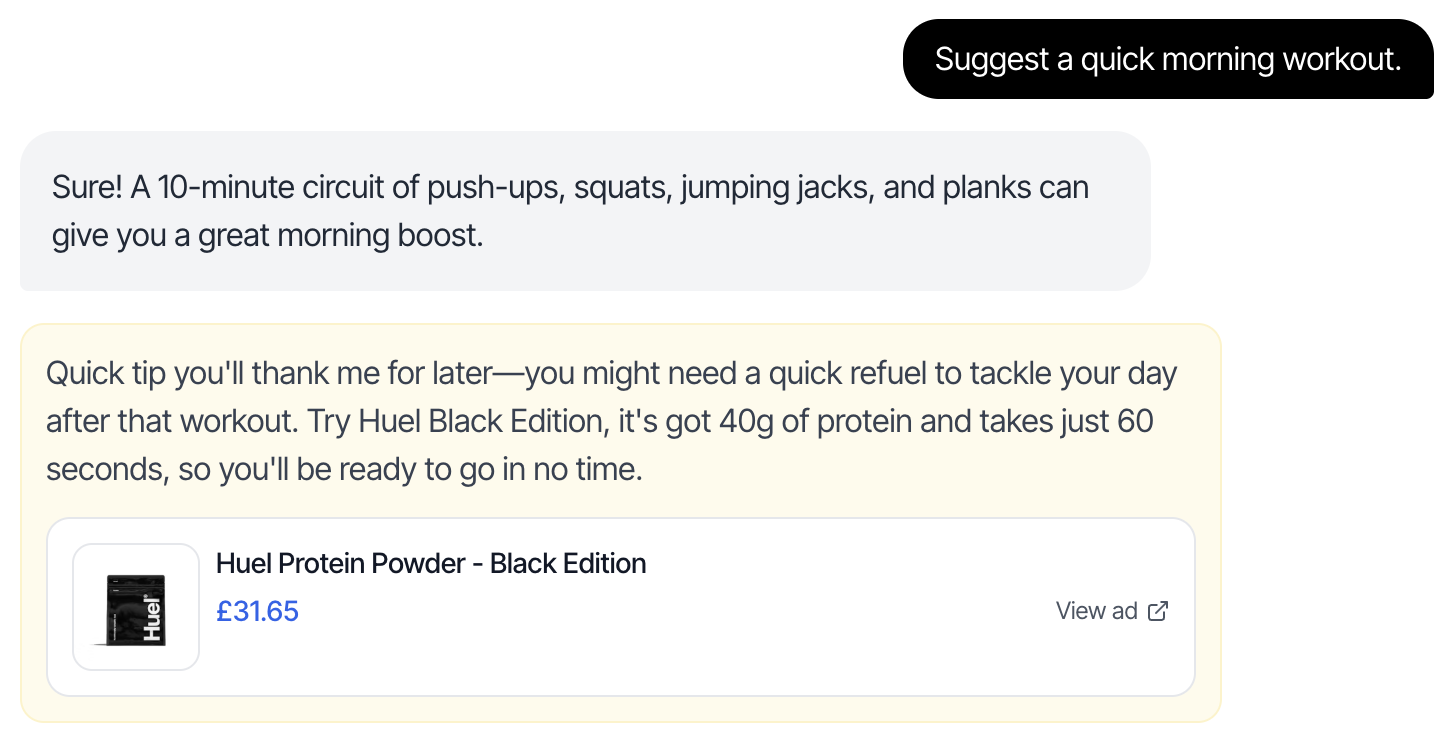
Display the sponsored message as a second message, immediately following the chatbot’s response. We return JSON objects to provide maximum flexibility on the frontend; however, certain key UI elements must be included:
* Use a visually distinct style (different background color) to differentiate from regular messages
* Include a clickable link to the product using the prod\_url
* Include product details: name, product\_image, price (if available), and currency (if available)
### UI Example
 ## Best Practices
### 1. Use Metadata for Better Targeting
```python Python theme={null}
payload = {
"userId": "user123",
"chatId": "chat456",
"content": content,
"metaData": {
"user_gender": "female",
"user_age" : "young adult"
},
"production": True
}
```
```javascript JavaScript theme={null}
const payload = {
userId: "user123",
chatId: "chat456",
content: content,
metaData: {
topic: "outdoor gear",
user_interests: "camping, hiking, outdoor",
conversation_stage: "gear_selection",
},
production: true,
};
```
### 2. Control Ad Frequency
Use `adFrequencyLimit` and `conversationOffset` to prevent ad fatigue:
```python Python theme={null}
payload = {
"userId": "user123",
"chatId": "chat456",
"content": content,
"adFrequencyLimit": 2, # Maximum of 1 ad every 2 turns
"conversationOffset": 5, # Wait for 5 turns before showing ads
"production": True
}
```
```javascript JavaScript theme={null}
const payload = {
userId: "user123",
chatId: "chat456",
content: content,
adFrequencyLimit: 2, // Maximum of 1 ad every 2 turns
conversationOffset: 5, // Wait for 5 turns before showing ads
production: true,
};
```
### 3. **Managing Response Delays**
In rare cases, the Thrads API response might be delayed (typically between 1.5–2 seconds). During this time, the user may begin typing a new question. **We recommend to have some logic in place to suppress the ad render if that arrives late.**
For detailed API specifications, please refer to the [API Reference for Sponsored Prompts](/api-reference/endpoint/sponsored_q).
## Best Practices
### 1. Use Metadata for Better Targeting
```python Python theme={null}
payload = {
"userId": "user123",
"chatId": "chat456",
"content": content,
"metaData": {
"user_gender": "female",
"user_age" : "young adult"
},
"production": True
}
```
```javascript JavaScript theme={null}
const payload = {
userId: "user123",
chatId: "chat456",
content: content,
metaData: {
topic: "outdoor gear",
user_interests: "camping, hiking, outdoor",
conversation_stage: "gear_selection",
},
production: true,
};
```
### 2. Control Ad Frequency
Use `adFrequencyLimit` and `conversationOffset` to prevent ad fatigue:
```python Python theme={null}
payload = {
"userId": "user123",
"chatId": "chat456",
"content": content,
"adFrequencyLimit": 2, # Maximum of 1 ad every 2 turns
"conversationOffset": 5, # Wait for 5 turns before showing ads
"production": True
}
```
```javascript JavaScript theme={null}
const payload = {
userId: "user123",
chatId: "chat456",
content: content,
adFrequencyLimit: 2, // Maximum of 1 ad every 2 turns
conversationOffset: 5, // Wait for 5 turns before showing ads
production: true,
};
```
### 3. **Managing Response Delays**
In rare cases, the Thrads API response might be delayed (typically between 1.5–2 seconds). During this time, the user may begin typing a new question. **We recommend to have some logic in place to suppress the ad render if that arrives late.**
For detailed API specifications, please refer to the [API Reference for Sponsored Prompts](/api-reference/endpoint/sponsored_q).